[1]:
import numpy as np
import matplotlib.pyplot as plt

from regpy.operators import Operator
from regpy.vecsps import UniformGridFcts
Volterra example with iterative regularised Gauss-Newton semismooth solver
The discrete Volterra operator. The Volterra operator \(V_n\) is defined as
Its discrete form, using a Riemann sum, is simply
where \(h\) is the grid spacing. \(V_1\) is linear.
Therefore, we create a subclass of regpy.Operator type in the next code block. In the following create new operators of that type can simply be done by initiating with that class. This class will have the following parameters. (Side remark you may also do the definition in a separate file for this example check out volterra.py in this example folder. )
Parameters
domain : regpy.vecsps.UniformGridFcts > The domain on which the operator is defined. Must be one-dimensional.
exponent : float > The exponent (n). Default is 1.
[2]:
class Volterra(Operator):
    def __init__(self, domain, exponent=1):
        assert isinstance(domain, UniformGridFcts)
        assert domain.ndim == 1
        self.exponent = exponent
        """The exponent."""
        super().__init__(domain, domain, linear=(exponent == 1))

    def _eval(self, x, differentiate=False):
        if differentiate:
            self._factor = self.exponent * x**(self.exponent - 1)
        return self.domain.volume_elem * np.cumsum(x**self.exponent)

    def _derivative(self, x):
        return self.domain.volume_elem * np.cumsum(self._factor * x)

    def _adjoint(self, y):
        x = self.domain.volume_elem * np.flipud(np.cumsum(np.flipud(y)))
        if self.linear:
            return x
        else:
            return self._factor * x
Initialization
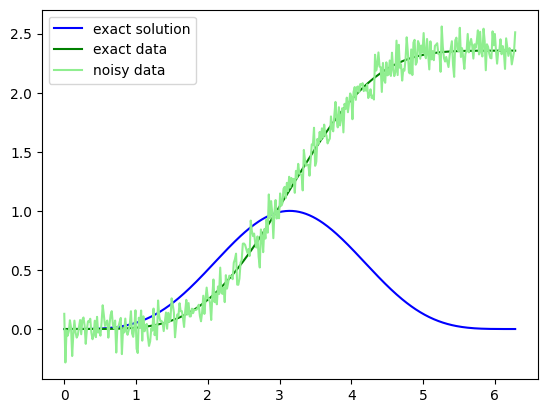
Having generally defined the Volterra operator above construct an explicit Volterra operator with exponent \(n=2\) on the interval \([0,2\pi]\) discretized by a UniformGridFcts with 200 points. Note, the operator will be non-linear operator since the exponent is not \(1\). Moreover, we choose the exact solution
for which the exact data is given by
Additionally we construct noise by sampling in the codomain a random vector. This noise \(\nu\) is then added to the exact data giving our noisy data \(g^\delta = g^\dagger + \nu\).
[3]:
grid = UniformGridFcts(np.linspace(0, 2 * np.pi, 400))
op = Volterra(grid,exponent=2)

exact_solution = (1-np.cos(grid.coords[0]))**2/4
plt.figure()
plt.plot(grid.coords[0],exact_solution,color="blue",label='exact solution')

exact_data = (3*grid.coords[0] - 4*np.sin(grid.coords[0]) + np.cos(grid.coords[0])*np.sin(grid.coords[0]))/8
noise = 0.1 * op.codomain.randn()
data = exact_data + noise
plt.plot(grid.coords[0], exact_data, color="green", label='exact data')
plt.plot(grid.coords[0], data, color="lightgreen", label='noisy data')
plt.legend()

print("Maximal error of operator evaluation on exact solution to exact data: {:.4E}".format(np.max(np.abs(op(exact_solution)-exact_data))))
plt.show()
Maximal error of operator evaluation on exact solution to exact data: 6.3814E-01
Regularization
First we define the regularization setting using the Setting and choosing \(L^2\) spaces defined on the UniformGridFcts. This setting is a general container which then can be used with solvers.
[4]:
from regpy.hilbert import L2
from regpy.solvers import Setting


setting = Setting(
    op=op,
    penalty=L2,
    data_fid=L2,
    data= data,
    regpar= 1.)
As a next step we choose an initial guess, in this case we choose something that is almost zero. Then using the setting and init information we can setup non-linear solver, which is the NewtonSemiSmoothFrozen. Which aims to solve the quadratic Tikhonov functionals
subject to bilateral constraints \(\psi_- \leq x \leq \psi_+\) in each step by linearizing the equation at the current iterate. The regularization parameter will be sequentially lowered using a geometric sequence which can be done by giving the tuple alpha = (alpha0,q) that creates the sequence \((\alpha_0 q^n)_{n=0,1,2,...}\) For our example we choose \(\psi_- = 0\) and \(\psi_+ = 1.1\) as constraints. Having these we only need to set an upper limit on the inner iterations
which we choose to be 10.
[5]:
from regpy.solvers.nonlinear import NewtonSemiSmoothFrozen


init = op.domain.ones()*0.00005
psi_minus = op.domain.ones()*0.0
psi_plus = op.domain.ones()*1.1

solver = NewtonSemiSmoothFrozen(
    setting,
    data,
    alphas = (1,0.9),
    psi_minus= psi_minus,
    psi_plus=psi_plus,
    init = init,
    inner_NSS_iter_max=10)
We stop the iterative algorithm after at most \(100\) steps and have as early stopping criterion the discrepancy rule implemented. This can be easily done by summing the two instances of the regpy.stoprules.
[6]:
import regpy.stoprules as rules
stoprule = (
    rules.CountIterations(100) +
    rules.Discrepancy(
        setting.h_codomain.norm, data,
        noiselevel=setting.h_codomain.norm(noise),
        tau=1.4
    )
)
2026-08-24 15:43:40,154 WARNING  Discrepancy          :: Initialization of Discrepancy with two positional arguments (norm, data) deprecated. Use one positional argument (noiselevel) and specifiy norm and data via a keyword argument setting!
WARNING:Discrepancy:Initialization of Discrepancy with two positional arguments (norm, data) deprecated. Use one positional argument (noiselevel) and specifiy norm and data via a keyword argument setting!
After everything is defined we can run the solver with the specified stopping rule using the method run() of the solver. However, in the following we use the until() which and extract the yielding elements to construct a nice output.
[7]:
recos = []
recos_data = []
for reco, reco_data in solver.until(stoprule):
    recos.append(1*reco)
    recos_data.append(reco_data)
2026-08-24 15:43:40,165 WARNING  Setting              :: Setting does not contain any explicit data.
WARNING:Setting:Setting does not contain any explicit data.
2026-08-24 15:43:40,167 WARNING  Setting              :: Overwriting existing data in setting!
WARNING:Setting:Overwriting existing data in setting!
2026-08-24 15:43:40,168 WARNING  TikhonovCG           :: Providing xref as an argument to the CG solver is deprecated. Please provide it via the setting. Results may not be consistent!
WARNING:TikhonovCG:Providing xref as an argument to the CG solver is deprecated. Please provide it via the setting. Results may not be consistent!
2026-08-24 15:43:40,173 WARNING  Setting              :: Setting does not contain any explicit data.
WARNING:Setting:Setting does not contain any explicit data.
2026-08-24 15:43:40,176 WARNING  Setting              :: Overwriting existing data in setting!
WARNING:Setting:Overwriting existing data in setting!
2026-08-24 15:43:40,177 WARNING  TikhonovCG           :: Providing xref as an argument to the CG solver is deprecated. Please provide it via the setting. Results may not be consistent!
WARNING:TikhonovCG:Providing xref as an argument to the CG solver is deprecated. Please provide it via the setting. Results may not be consistent!
2026-08-24 15:43:40,181 WARNING  Setting              :: Setting does not contain any explicit data.
WARNING:Setting:Setting does not contain any explicit data.
2026-08-24 15:43:40,182 WARNING  Setting              :: Overwriting existing data in setting!
WARNING:Setting:Overwriting existing data in setting!
2026-08-24 15:43:40,184 WARNING  TikhonovCG           :: Providing xref as an argument to the CG solver is deprecated. Please provide it via the setting. Results may not be consistent!
WARNING:TikhonovCG:Providing xref as an argument to the CG solver is deprecated. Please provide it via the setting. Results may not be consistent!
2026-08-24 15:43:40,187 WARNING  Setting              :: Setting does not contain any explicit data.
WARNING:Setting:Setting does not contain any explicit data.
2026-08-24 15:43:40,188 WARNING  Setting              :: Overwriting existing data in setting!
WARNING:Setting:Overwriting existing data in setting!
2026-08-24 15:43:40,189 WARNING  TikhonovCG           :: Providing xref as an argument to the CG solver is deprecated. Please provide it via the setting. Results may not be consistent!
WARNING:TikhonovCG:Providing xref as an argument to the CG solver is deprecated. Please provide it via the setting. Results may not be consistent!
2026-08-24 15:43:40,193 WARNING  Setting              :: Setting does not contain any explicit data.
WARNING:Setting:Setting does not contain any explicit data.
2026-08-24 15:43:40,195 WARNING  Setting              :: Overwriting existing data in setting!
WARNING:Setting:Overwriting existing data in setting!
2026-08-24 15:43:40,196 WARNING  TikhonovCG           :: Providing xref as an argument to the CG solver is deprecated. Please provide it via the setting. Results may not be consistent!
WARNING:TikhonovCG:Providing xref as an argument to the CG solver is deprecated. Please provide it via the setting. Results may not be consistent!
2026-08-24 15:43:40,200 WARNING  Setting              :: Setting does not contain any explicit data.
WARNING:Setting:Setting does not contain any explicit data.
2026-08-24 15:43:40,202 WARNING  Setting              :: Overwriting existing data in setting!
WARNING:Setting:Overwriting existing data in setting!
2026-08-24 15:43:40,203 WARNING  TikhonovCG           :: Providing xref as an argument to the CG solver is deprecated. Please provide it via the setting. Results may not be consistent!
WARNING:TikhonovCG:Providing xref as an argument to the CG solver is deprecated. Please provide it via the setting. Results may not be consistent!
2026-08-24 15:43:40,207 WARNING  Setting              :: Setting does not contain any explicit data.
WARNING:Setting:Setting does not contain any explicit data.
2026-08-24 15:43:40,208 WARNING  Setting              :: Overwriting existing data in setting!
WARNING:Setting:Overwriting existing data in setting!
2026-08-24 15:43:40,209 WARNING  TikhonovCG           :: Providing xref as an argument to the CG solver is deprecated. Please provide it via the setting. Results may not be consistent!
WARNING:TikhonovCG:Providing xref as an argument to the CG solver is deprecated. Please provide it via the setting. Results may not be consistent!
2026-08-24 15:43:40,214 WARNING  Setting              :: Setting does not contain any explicit data.
WARNING:Setting:Setting does not contain any explicit data.
2026-08-24 15:43:40,216 WARNING  Setting              :: Overwriting existing data in setting!
WARNING:Setting:Overwriting existing data in setting!
2026-08-24 15:43:40,217 WARNING  TikhonovCG           :: Providing xref as an argument to the CG solver is deprecated. Please provide it via the setting. Results may not be consistent!
WARNING:TikhonovCG:Providing xref as an argument to the CG solver is deprecated. Please provide it via the setting. Results may not be consistent!
2026-08-24 15:43:40,222 WARNING  Setting              :: Setting does not contain any explicit data.
WARNING:Setting:Setting does not contain any explicit data.
2026-08-24 15:43:40,223 WARNING  Setting              :: Overwriting existing data in setting!
WARNING:Setting:Overwriting existing data in setting!
2026-08-24 15:43:40,224 WARNING  TikhonovCG           :: Providing xref as an argument to the CG solver is deprecated. Please provide it via the setting. Results may not be consistent!
WARNING:TikhonovCG:Providing xref as an argument to the CG solver is deprecated. Please provide it via the setting. Results may not be consistent!
Plotting
Finally, we plot the output.
[8]:
import matplotlib.animation

plt.rcParams["animation.html"] = "jshtml"
plt.rcParams['figure.dpi'] = 150
plt.ioff()
fig, axs = plt.subplots(1,2)

def animate(t):
    axs[0].cla()
    axs[0].plot(exact_solution,color="blue")
    axs[0].plot(recos[t],color="lightblue")
    axs[0].set_ylim(ymin=0,ymax=1.5)

    axs[1].cla()
    axs[1].plot(exact_data,color="green", label='exact')
    axs[1].plot(recos_data[t],color="orange", label='reco')
    axs[1].plot(data, color="lightgreen", label='measured')
    axs[1].set_ylim(ymin=-0.2,ymax=2.5)

matplotlib.animation.FuncAnimation(fig, animate, frames=len(recos))
[8]: